From Netstat to Packet Tracer
Learning to Observe Network Traffic
As I continue working through my networking studies, I recently completed my third networking lab on LabEx, where I practiced using the netstat command to inspect network activity on a Linux system.
I wanted to reinforce that learning with a practical exercise in Cisco Packet Tracer. Rather than simply repeating commands, I wanted to start understanding what network activity looks like and how devices communicate.
Here’s what I built, what I investigated, and what I learned.
The Lab Setup
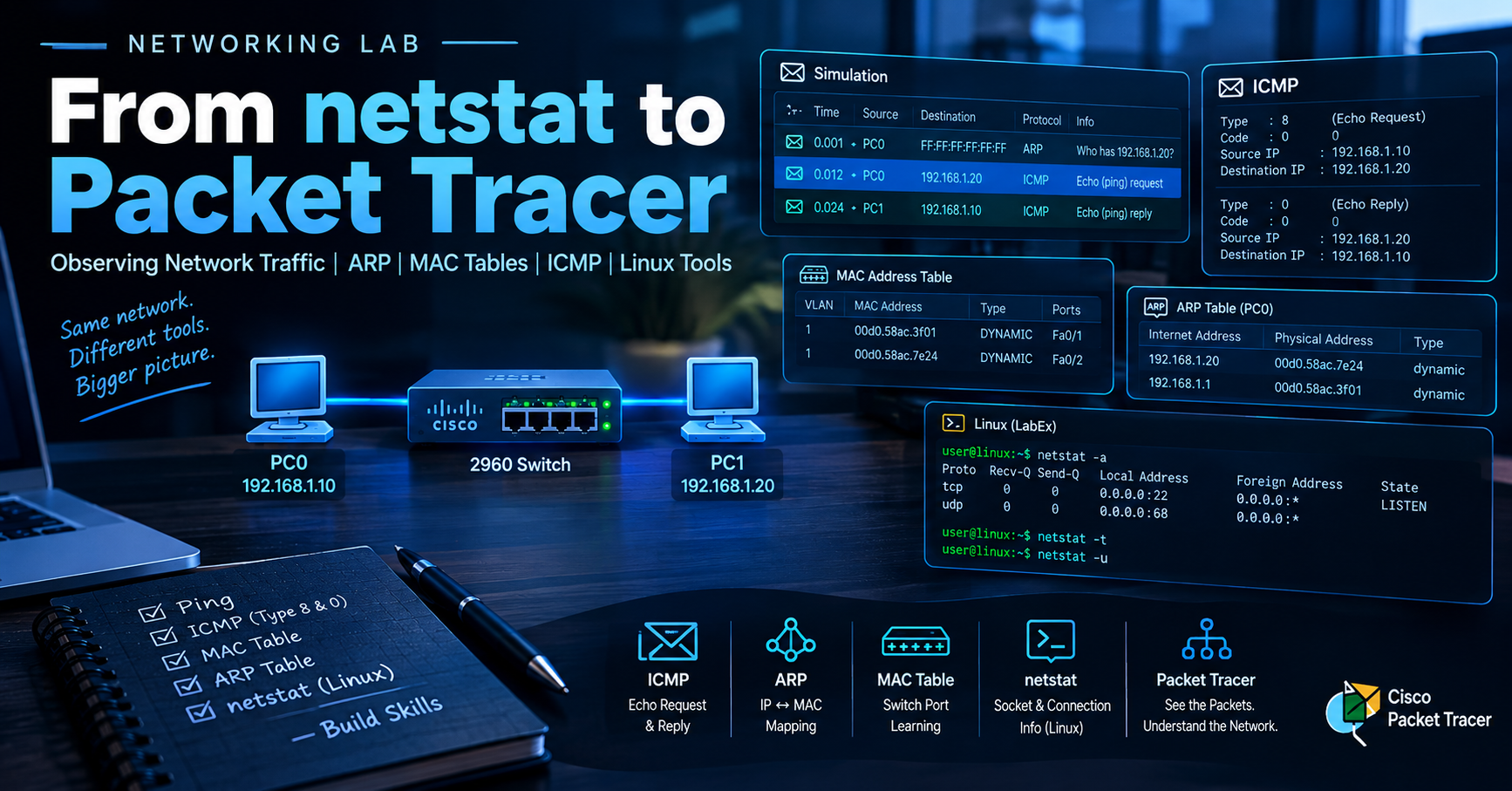
I started with a basic LAN consisting of two PCs connected to a Cisco 2960 switch.
Topology:
PC0: 192.168.1.10 PC1: 192.168.1.20 Subnet mask: 255.255.255.0 One Cisco 2960 switch The goal was to establish connectivity, generate network traffic, and investigate what happened behind the scenes.
One early mistake was connecting the PCs directly to each other instead of connecting both to the switch. Once I corrected the topology, I could continue testing connectivity.
It’s a simple mistake, but it reinforced an important lesson: before troubleshooting higher-level networking issues, verify the physical connections first.
- Testing Connectivity with Ping
I started by running the following command from PC1:
ping 192.168.1.20
This tested whether PC1 could communicate with PC2.
Instead of stopping after seeing successful replies, I opened Simulation Mode in Packet Tracer and filtered the events to observe ARP and ICMP traffic.
This allowed me to inspect the packets rather than treating ping as a command that simply returns a success or failure message.
- Identifying ICMP Echo Requests and Replies
When I opened the packet details, I found an ICMP Type field.
The first packet I inspected showed:
ICMP Type 8: Echo Request ICMP Type 0: Echo Reply An Echo Request is the message sent by PC0 when it pings PC1. The Echo Reply is the response returned by PC1.
This was a useful exercise because I could verify the purpose of each packet directly in the simulation.
I wasn’t just seeing that the ping worked. I was observing the request and response that made the connectivity test possible.
- Investigating MAC Addresses on the Switch
Next, I opened the switch CLI and ran:
enable
show mac address-table dynamic
The switch displayed learned MAC addresses associated with its interfaces.
This helped me understand that a switch maintains a MAC address table to determine which port to use when forwarding Ethernet frames.
The table connects two important pieces of information:
The MAC address of a device. The switch port through which that address was learned. This is different from an IP routing table. A Layer 2 switch uses its MAC address table to forward Ethernet frames within a LAN.
- Inspecting the ARP Table
I then opened PC0’s command prompt and ran:
arp -a
I found PC1’s IP address associated with a physical address, which is its MAC address.
ARP, or Address Resolution Protocol, helps a device discover the MAC address associated with an IPv4 address on the local network.
This gave me an opportunity to compare two tables that contain MAC address information but serve different purposes.
The ARP table on PC0 maps IP addresses to MAC addresses known by the host.
The switch’s MAC address table associates learned MAC addresses with switch ports.
Both are useful when investigating local network communication, but they answer different questions.
An ARP entry also doesn’t guarantee that a device is reachable at that exact moment. A successful ping provides additional evidence that communication is working.
- Connecting the Exercise to Linux
netstat
My LabEx exercise focused on using netstat to inspect network activity on Linux.
Some of the commands I practiced included:
netstat -a
netstat -t
netstat -u
netstat -l
netstat -n
These options help inspect socket information, including active and listening sockets, TCP and UDP sockets, and numerical addresses and port numbers.
Packet Tracer doesn’t reproduce the Linux netstat command or its socket output. Instead, it provides a complementary way to observe network communication at the packet level.
The distinction is important:
Linux netstat: Helps investigate sockets and network connections on a system. Packet Tracer Simulation Mode: Helps visualize individual packets and inspect their protocol information. arp -a: Displays the host’s ARP cache. show mac address-table dynamic: Displays MAC addresses dynamically learned by the switch. These tools provide different views of networking. Learning what each one reveals is part of developing a troubleshooting process.
What I Learned
This exercise reinforced several networking fundamentals:
Physical connectivity needs to be verified before moving on to higher-level troubleshooting. Ping uses ICMP Echo Requests and Echo Replies to test reachability. ARP maps IPv4 addresses to MAC addresses on the local network. Switches learn MAC addresses from incoming Ethernet frames and associate them with ports. A successful command is only part of the learning process. Inspecting the output helps explain what actually happened. I’m still building my understanding of these concepts, but being able to generate traffic, inspect packets, and compare device tables gives me a more practical foundation than memorizing commands alone.
What’s Next?
My next step is to build on this foundation with a small client-server network in Packet Tracer. I want to observe TCP connections and application traffic, then relate what I see to the socket and port information available through Linux networking tools.
I’m working toward becoming a network engineer, and I’m trying to make each lab count by connecting the theory to something I can observe and troubleshoot.
One lab at a time.
About the author
- I have always wanted to be a network engineer, but I gave up trying almost two years ago. But now I want to leave the ABA field and become one. This is my journey.
Comments
Join the discussionNo comments yet. Be the first to comment.
Networking Labs
Documentation of a BT (Behavioral Technician)'s journey to become a Network Engineer. From the Network+ --> CCNA